
Last Updated on November 16, 2026 7:47 pm by INDIAN AWAAZ
Match a Lenovo Idea Tab to the way you use it, whether that’s lecture notes, client presentations or late-night series, and pay through Easy EMIs.
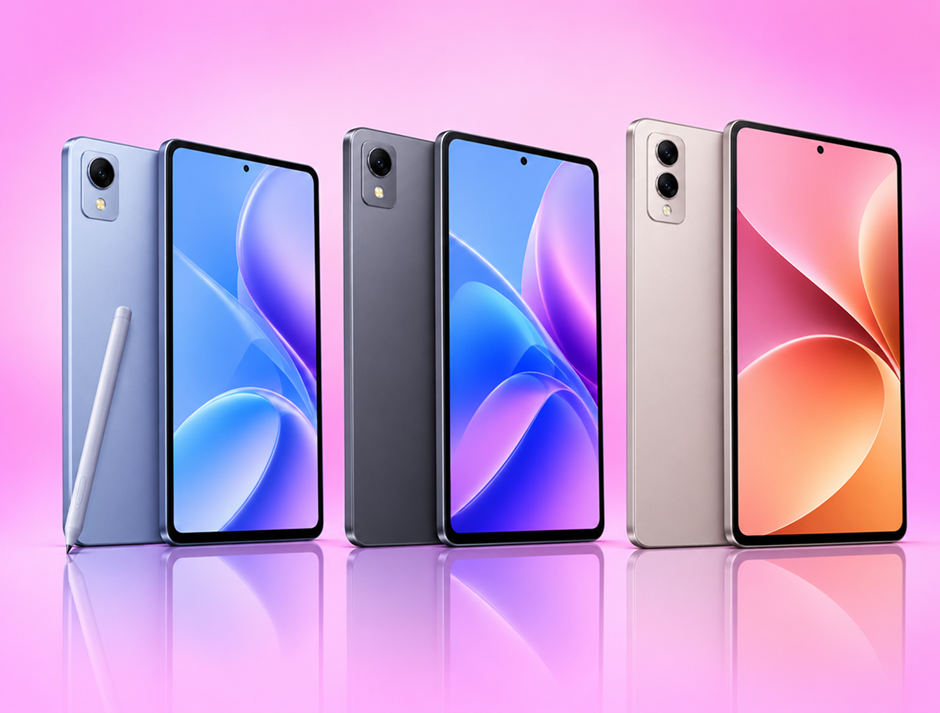
Lenovo’s Idea Tab range gives you a model for each kind of user. The Idea Tab suits students, the Idea Tab Pro suits work, and the Idea Tab Plus suits streaming on the go. This guide explains what to check before you buy, then pairs each tablet with the routine it fits best.
To widen your search, browse tablets across brands or compare the full range of Lenovo tablets by specification. When you’re ready, the Bajaj Finance Easy EMI Loan gives you a loan offer amount of up to Rs. 5 lakh, with tenures of 3–60 months, at 1.5 lakh+ partner stores across 4,000+ cities.
What should you check before buying a Lenovo tablet?
Think about where and how you’ll hold the tablet each day. Then check these five points:
- Screen size and sharpness: An 11-inch screen is easy to hold in one hand on a bus. A 12-inch-plus screen gives documents and films more room, and 2.5K or 3K resolution keeps small text crisp.
- Chipset: The Dimensity 6000 series handles notes, video calls and streaming. The Dimensity 8300 adds headroom for split-screen work and editing apps.
- RAM and storage: 8GB RAM with 256GB storage covers most needs. Expandable storage helps if you download lectures or films.
- Battery and charging: A 10,000 mAh-plus battery and 45 W charging suit long days away from a plug point.
- Pen and connectivity: A bundled stylus helps with handwritten notes. A 5G model lets you stream without hunting for Wi-Fi.
How do the Idea Tab, Idea Tab Pro and Idea Tab Plus compare?
Here are the three tablets side by side.
| Spec | Lenovo Idea Tab | Lenovo Idea Tab Pro | Lenovo Idea Tab Plus |
| Chipset | Dimensity 6300 | Dimensity 8300 | Dimensity 6400 |
| RAM + storage | 8GB + 256GB | 12GB + 256GB | 8GB + 256GB |
| Display | 11-inch 2.5K, 90Hz | 12.7-inch 3K, 144Hz | 12.1-inch 2.5K, 90Hz |
| Battery | 7,040 mAh | 10,200 mAh | 10,200 mAh |
| Charging | 20 W | 45 W | 45 W |
| Connectivity | Wi-Fi | Wi-Fi | 5G |
The Idea Tab Pro brings the fastest chipset and the smoothest 144Hz screen of the three, which makes it the natural pick for heavier work. The Idea Tab Plus matches its battery and charging speed and adds 5G. The Idea Tab keeps things compact for daily study.
Which Lenovo Tab fits your routine?
For study: Lenovo Idea Tab
Lenovo launched the Idea Tab in India in August 2025. The variant listed here comes with a pen, so you can annotate PDFs and write notes by hand. Its 11-inch 2.5K display keeps diagrams and textbook pages clear, while the Dimensity 6300 chipset runs Google Classroom, Zoom and note apps comfortably. You can expand the 256GB storage with a memory card for recorded lectures, and four speakers with Dolby Atmos help in online classes.
For work: Lenovo Idea Tab Pro
The Idea Tab Pro pairs a Dimensity 8300 chipset with 12GB RAM, so you can run a spreadsheet beside a video call without slowdown. Its 12.7-inch 3K screen at 144Hz gives slides and reports plenty of space. Lenovo’s Tab Pen Plus comes in the box, and the tablet also works with an optional 2-in-1 keyboard. Quad JBL speakers with Dolby Atmos keep conference calls clear.
For streaming: Lenovo Idea Tab Plus
The Idea Tab Plus launched in India in December 2025. It pairs a 12.1-inch 2.5K display, rated at up to 800 nits, with quad speakers tuned for Dolby Atmos. The 5G variant lets you stream on the move. Its 10,200 mAh battery lasts through long journeys, and 45 W charging tops it up quickly before you head out.
What do these Lenovo tablets cost?
Prices vary by tier, so you can match what you pay to how hard the tablet will work. Easy EMIs turn each price into a fixed monthly amount.
| Tablet | Variant | Price |
| Lenovo Idea Tab (Wi-Fi, with Pen) | 8GB + 256GB | Rs. 38,000 |
| Lenovo Idea Tab Pro (Wi-Fi) | 12GB + 256GB | Rs. 48,999 |
| Lenovo Idea Tab Plus (5G) | 8GB + 256GB | Rs. 52,000 |
Disclaimer: Prices may change based on availability, offers, and location. Please check the latest price before buying.
Which offers help you buy a Lenovo tablet?
Easy EMIs start from Rs. 830, with tenures from 3 to 60 months. A shorter plan finishes your repayments within the academic year. A longer plan keeps each payment easy on a starting salary. Zero down payment on select models means you pay nothing at billing, and up to 60% off select tablets reduces what you finance.
How do you buy a Lenovo tablet on Easy EMIs?
You can pay using the Bajaj Finance Easy EMI Loan or the Bajaj Finance Insta EMI Card, which carries a loan offer amount of up to Rs. 3 lakh. Here’s the process:
- Pick the tablet that matches your study, work or streaming needs.
- Check your loan eligibility online before you go.
- Find a Bajaj Finance partner store close to home or office.
- Try the screen, speakers and pen in the store.
- Choose your Easy EMI Loan or Insta EMI Card at the counter.
- Select a tenure and complete a short verification.
- Take your Lenovo tablet home once the plan is approved.
Which Lenovo tablet should you choose?
For notes, online classes and textbooks, the Lenovo Idea Tab with its bundled pen gives you a compact study companion. For presentations, multitasking and long workdays, the Idea Tab Pro brings 12GB RAM and a 144Hz 3K display. For films and series wherever you are, the Idea Tab Plus pairs 5G with a bright 12.1-inch screen. With Easy EMIs over 3–60 months at 1.5 lakh+ partner stores across 4,000+ cities, the tablet you choose fits your monthly budget.